Add a client. The agent plans, writes and posts for them.
Connect a client's accounts and fill in a short brief. Every Monday the agent plans their week, writes each post in their voice and schedules it. You check the plan, the client approves it from a link, and the posts go out on time. Works for one client or fifty.
No credit card required
- 09:00
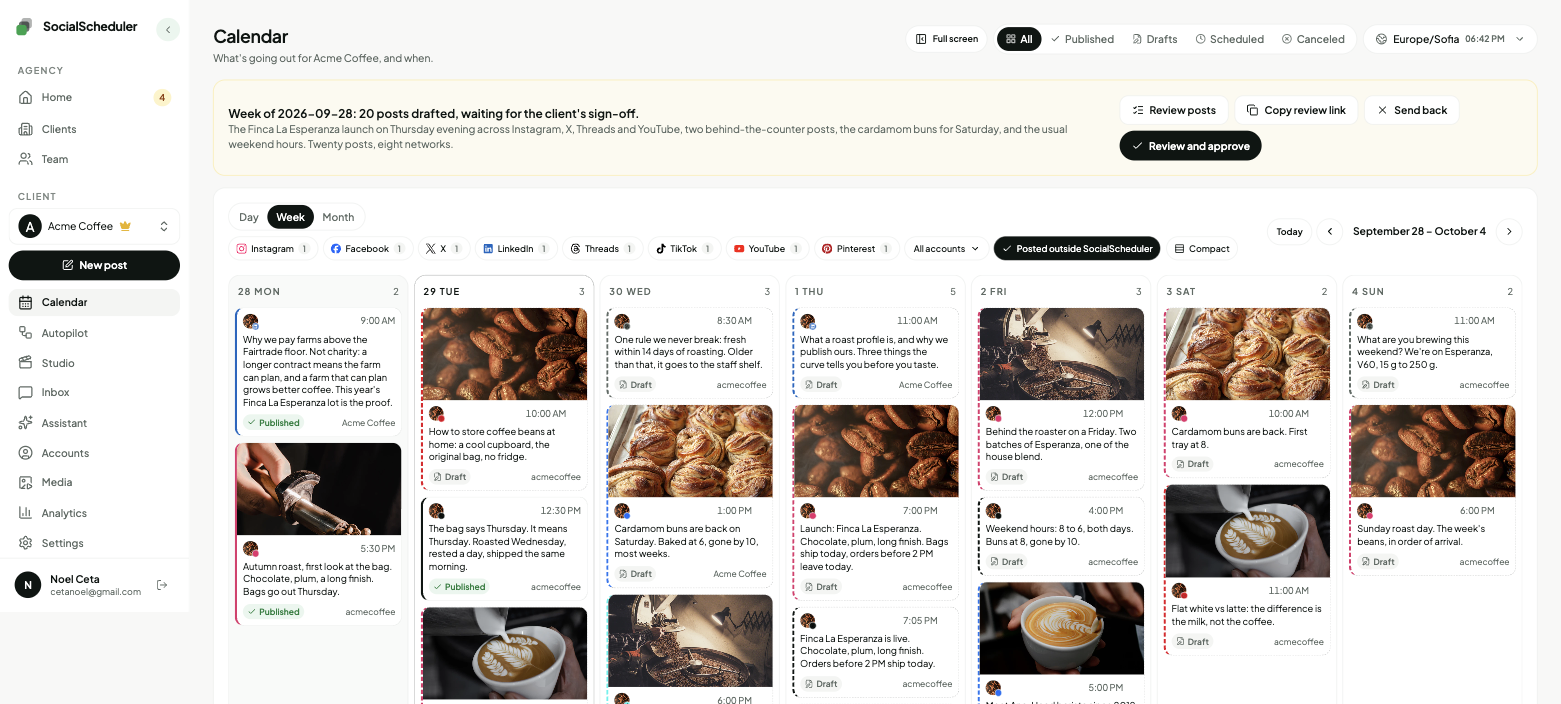
Planned Acme Coffee's week
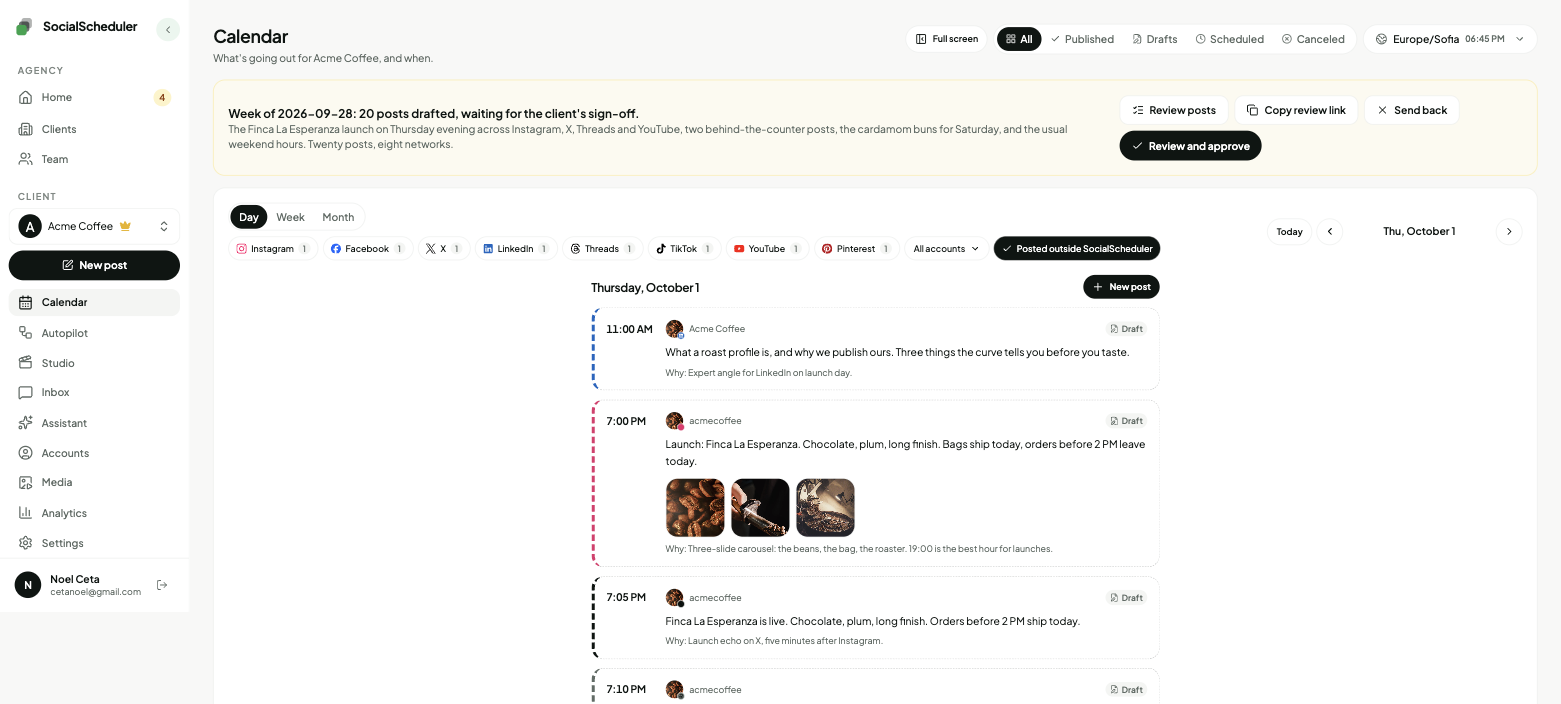
12 posts across 4 platforms, built around Thursday's launch.12 posts across 4 platforms, built around Thursday's launch.
MTWTFSS - 09:02
Drafted “Autumn roast launch”
After three months of sourcing, our autumn roast is here. Small batch, big mornings.After three months of sourcing, our autumn roast is here. Small batch, big mornings.
- 09:02
Adapted for X
Trimmed to 280 characters. Hashtags moved to the first reply.Trimmed to 280 characters. Hashtags moved to the first reply.
- 09:04
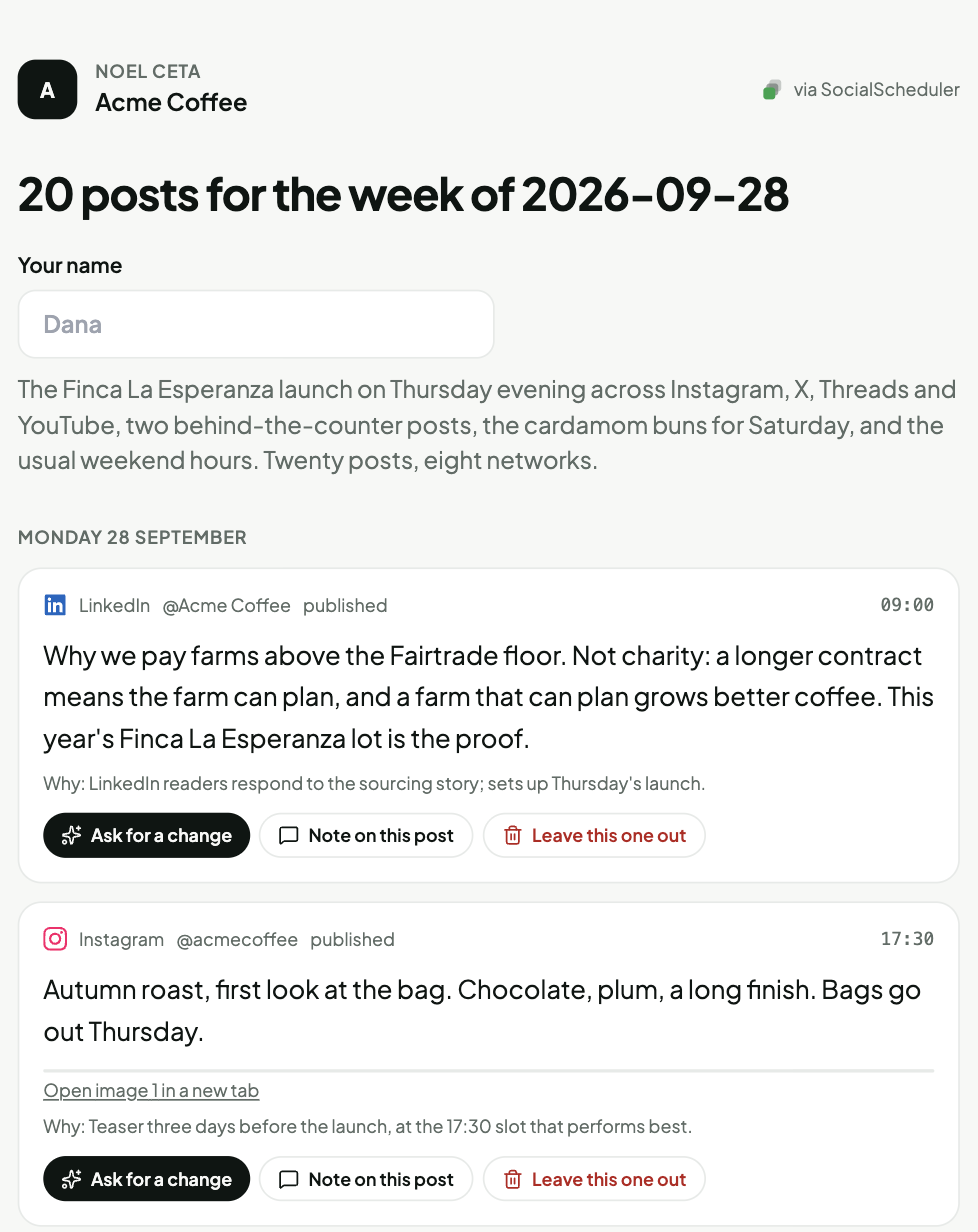
Sent to Dana at Acme for sign-off
One link, no login. Approved at 10:12.One link, no login. Approved at 10:12.
- 18:00
Published to Instagram, LinkedIn and X
Native posts through each platform's API.Native posts through each platform's API.
live - 18:40
2.1k reach in 40 minutes
Noted for Acme: launch posts land best on Thursday evenings.Noted for Acme: launch posts land best on Thursday evenings.
What happens every week.
Once a client is set up, this runs on its own for them. You step in only where you choose to.
- Week 3812 postsMTWTFSS01
Plan
Monday, 9:00. The agent reads the client's brief, upcoming dates and last week's numbers, then builds a week of posts: what to say, on which platform, on which day.
After three months of sourcing, our autumn roast is here.
InstagramLinkedInXTikTok02Create
It writes each post in the client's voice, then fits it to each platform: shorter for X, hashtags for Instagram, none in the LinkedIn body, vertical video for TikTok.
- acmecoffeeThu · 6:00 PM
Our autumn roast is here. Small batch, big mornings.
Live03Post
Approved posts go out through each platform's official API at the hour that audience is online. No copying between tabs, no third-party watermark.
- Roast launch+38% · more like thisMonThuSun04
Learn
After each post it records reach and engagement. Next Monday's plan uses those numbers: more of what worked, less of what didn't.
One workspace per client. One screen for your team.
Each client gets their own workspace: connected accounts, calendar, media library and brand profile. Nothing is shared between clients. Your team sees every workspace on one roster, with a list of what needs a person.
- Add a client in about ten minutes: connect accounts, fill in the brief, pick who approves
- Give teammates a role per client: Owner, Admin, Editor or Viewer
- Clients approve from a link. They never need a login.
- ACAcme Coffee12 posts · 4 platformsWeek planned
- NGNorthwind Gym3 posts with the clientAwaiting sign-off
- LDLumen Dental9 posts · 3 platformsWeek planned
- HRHarbor RealtyListing post live at 6 PMPublishing
- FFern & Co.14 posts · 5 platformsWeek planned
- BBBluebird BooksBrand profile 80% builtOnboarding
Six jobs it does without being asked.
And one chat for everything else.
Plans every client's week
Every Monday it builds each client's calendar from their brief, upcoming dates and last week's numbers.
Writes in each client's voice
Each client has a profile: tone, topics, words to avoid, example posts. Every draft is written and checked against it.
Adapts per platform
One post becomes the right version for each network: length, format, hashtags, first comment.
Picks the hour
It tracks when each client's followers are online, per platform, and schedules into those hours.
Repurposes long-form
Paste a blog post, a newsletter or a video link. It turns it into a week of posts for that client.
Learns from results
It reads reach and engagement after each post and changes the next plan accordingly.
Ask it anything.
Type a question about any client and get an answer, a draft or a plan change. Ask it to rewrite Friday's post shorter, or which client did worst last week and why.
What one client's week looks like.
Acme Coffee, week 38. Your team approved the plan Monday morning. Everything else on this board the agent did on its own.
- Plan
- Draft
- Publish
- Learn
Choose who approves, per client.
Pick one of three approval paths for each client and change it whenever you want. In every path your team can edit or cancel a post right up until it goes out.
Agency reviews
DefaultYour account manager gets the week's plan Monday morning and approves it in the dashboard. Nothing goes out before that.
Client signs off
Most usedThe client gets an email with a review link. They read each post, approve it or leave a comment. No login, no seat. Their comments show up in your dashboard.
Review link · no login needed
Dana (Acme) · approved Mon 10:12
Full autopilot
For trusted clientsNo approval step. The agent plans and posts on schedule. Your team gets the Monday roll-up, the client gets their report.
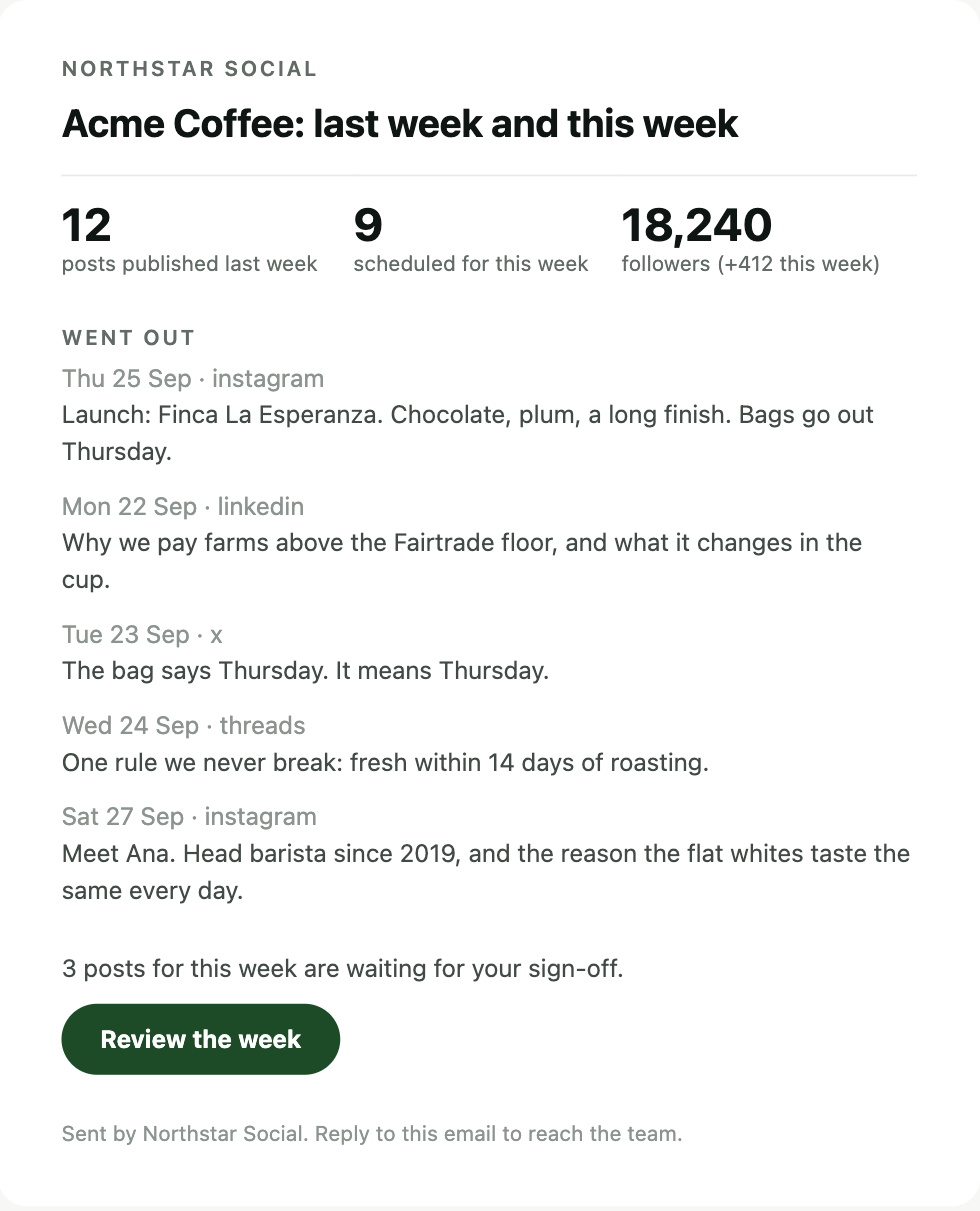
Client report every Monday, 9:00
Pause anytime, pull any post
Sunday night, then Monday morning.
The same six clients and the same week, without the agent and with it.
Before · Sunday, 11:40 PM
6 clients · 14 tabs · 0 posts scheduled
After · Monday, 9:00 AM
What the agent works from.
Five things it knows about each client. You set them up once and it keeps them current. Nothing crosses between clients.
Each client's voice
Tone, topics, rules and example posts, filled in from a short brief. It updates itself when your team edits a draft.
Tone
Warm, direct, no hype
Never
Countdown urgency, emojis on LinkedIn
Always
Link the docs, credit the team
“Sounds like: we shipped the thing. Here is what it does, and what it doesn't do yet.”
Each audience's hours
When each client's followers are online, per platform, taken from that account's own data.
Each platform's rules
Character limits, image sizes, video formats and hashtag habits, applied before a post is scheduled.
Each client's calendar
Launches, events and campaigns you add. The week's plan is built around them.
What worked
Reach and engagement per post. The next plan does more of what performed and less of what didn't.
Every Monday, each client gets a report with your logo on it.
One page: what went out last week, how it did, what is planned this week, and anything waiting on their approval. It is sent under your agency's name, not ours. Your team gets one roll-up across every client.
Week 38 for Acme Coffee.
- Autumn roast launchThu 6:00 PM · Instagram · LinkedIn · XApproveEdit
- Barista Q&AWed 12:00 PM · Instagram · ThreadsApproveEdit
- Weekend hoursFri 5:00 PM · Facebook · InstagramApproveEdit
Questions, answered.
About ten minutes. Connect their social accounts, fill in a short brief about their brand, and choose who approves posts. The first week's plan is ready right away; after that a new one arrives every Monday.
No. They get an email with a review link. They open it, read the posts, and approve or comment. No login, no seat, nothing to install.
No. Each client is a separate workspace with its own accounts, media and calendar. A review link shows only that client's posts.
The client's. You fill in a brief per client and paste a few posts they like. The agent writes from that, and updates the profile whenever your team edits one of its drafts.
Edit the post, or reject it with a note. Both feed the next plan. You can also add hard rules per client, for example words it must never use or topics it must never touch.
Yes. Client reports and review links show your agency's name and logo, not ours.
One workspace per client. The number of clients and team seats depends on your plan; see the pricing page.
Yes. Add SocialScheduler as a connector in Claude or ChatGPT and plan a client's week from there. Your assistant gets the client's brief, knowledge base, recent posts and numbers, and the week still goes through the client's normal approval path.
Every plan includes a monthly allowance. A planned week costs 10 credits, a brief draft 2, an assistant message 1. Run out and you can buy a pack; nothing you already scheduled is affected.
Start with one client.
Connect their accounts, fill in the brief, choose who approves. The first week's plan is ready in minutes.