The Twitter (X) scheduler for agencies.
It plans each client's week, writes every post to fit 280 characters and schedules it for the hour their followers are online. Replies come back to one inbox, and the client gets a report every Monday.
SocialScheduler is a Twitter (X) scheduler for agencies. Every Sunday it plans each client's week, writes each post in the client's voice to fit 280 characters, adds an image or short video when it helps, and schedules it for the hour that client's followers are online. The client approves from an email link without a login, and replies land in one inbox.
Free for one client. No credit card.
X scheduling at a glance
- Post length
- 280 characters; a link counts as 23
- Long posts and threads
- Not supported: single posts up to 280 characters
- X media rules
- Up to 4 images, or 1 video, or 1 GIF per post
- X video limit
- 2 min 20 s and 512 MB on standard accounts
- Best times on X
- Tue to Thu, 12 to 6 p.m. local (Sprout Social, 2026)
- Inbox
- Replies and DMs with keyword rules
- Price
- Free for 1 client; Business $49/mo; Agency $149/mo
- Reviewed
- September 29, 2026
Every X format your clients use.
Planned on Sunday with the rest of the week. Written in the client's voice. Designed in their brand.
Text posts
One idea, written to 280 characters and counted before scheduling.
Image posts
A photo from the client's library, Unsplash, or an image the AI designs.
Short video
A vertical video with captions and a voiceover.
Replies and metrics
Replies land in the inbox. Each post's metrics feed the next plan.
How the AI writes for X.
The limits and habits of the network are built in. Every post is checked against them before it is scheduled.
- 280 characters, checked before scheduling
- Links counted as 23 characters
- One idea per post
- No hashtags in the body
- Image or video only when it helps
- Posted at the client's best hour
- Results feed next week's plan
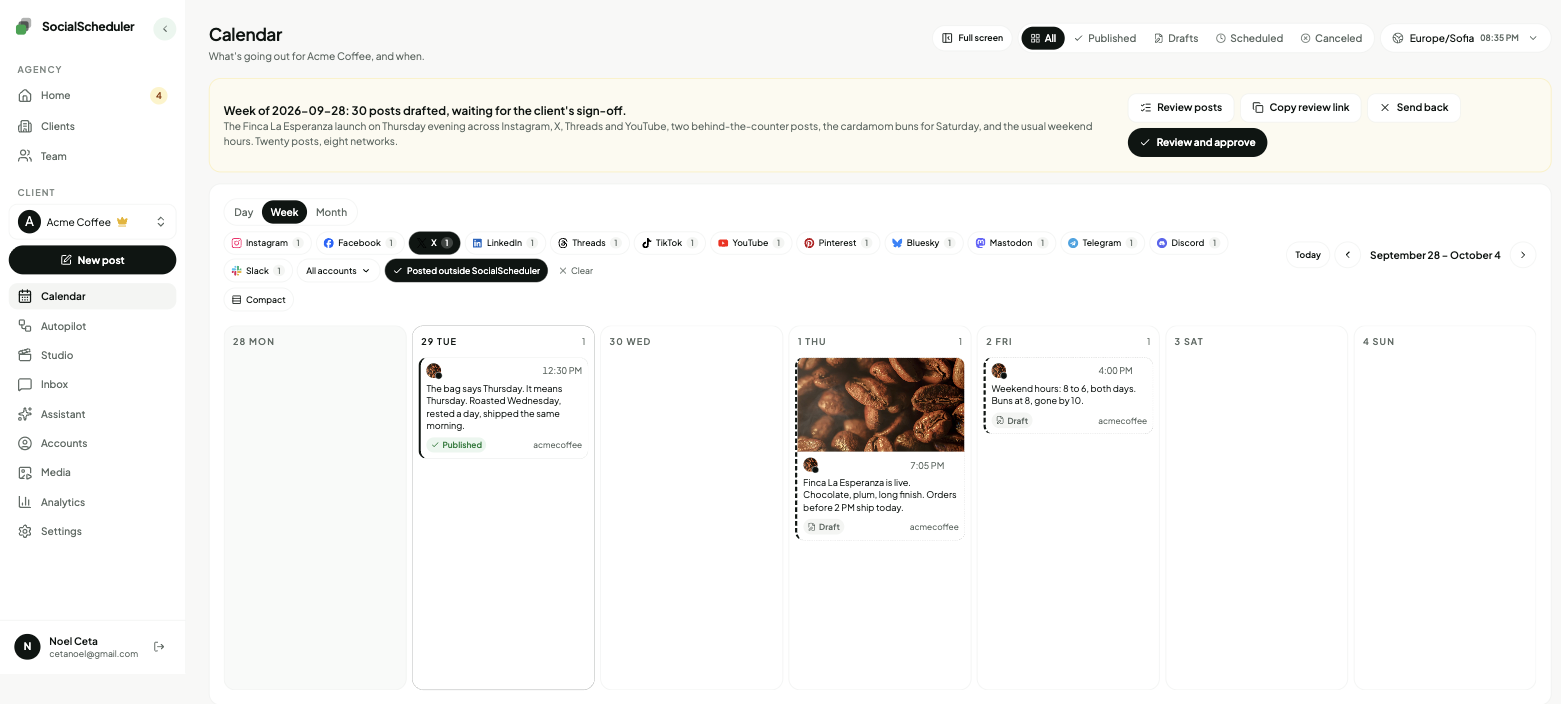
Planned Sunday. Waiting for approval.
- Tue09:00TextThe bag says Thursday. It means Thursday.
- Wed12:30ImageAutumn roast, first cup. Chocolate and plum.
- Thu16:00VideoThirty seconds inside the roaster at 6 a.m.
You choose who says yes.
Per client. Change it any time. Your team can pull any X post until it goes out.
Agency reviews
DefaultYour team approves the week in the app. Nothing goes out before.
Client signs off
Most usedThe client gets an email link. They approve or comment. No login.
Review link · no login needed
Dana (Acme) · approved Mon 10:12
Full autopilot
For trusted clientsNo approval step. It plans and posts. Everyone gets a Monday report.
Client report every Monday, 9:00
Pause any time, pull any post
Why agencies still schedule X posts
X is where news breaks, founders talk shop and customers complain in public. For many B2B, media and tech clients it is still the fastest way to be seen by the people who matter to them. It also rewards a steady rhythm, which is hard to keep when you run ten accounts by hand.
X has a built-in scheduler: on the desktop web you pick a date and time in the composer, up to 18 months ahead, and mobile scheduling needs X Pro. It works one account at a time, with no plan, no client approval and no report. A Twitter scheduler built for agencies adds those parts: each client's week is planned, written and queued, and the client signs off before anything goes out.
How the writer handles the 280-character limit
Standard X posts are capped at 280 characters. X counts every link as 23 characters, because it wraps links in its t.co shortener, and attached images or video count as zero. X Premium accounts can post up to 25,000 characters, but X's own help center says long posts cannot be scheduled.
SocialScheduler writes every X post to fit 280 characters and counts a link as 23, the way X does. The count runs again before the post is scheduled, so nothing gets cut off. Each post carries one idea and a clear first line. Hashtags stay out of the body.
- Posts are written to 280 characters, not Premium long posts
- Threads are not supported today: every X post is a single post
- An image or short video is attached only when it adds something
The agency workflow on X
Each client starts with a brief: what they sell, who they talk to, words they use and words they never use. On Sunday the AI plans the client's week across every network they are on and writes the X posts from that plan, sized for X rather than copied from LinkedIn.
You choose who approves, per client. Your team can approve in the app, the client can approve, comment or ask for a change from an email link with no login, or you can turn on autopilot for clients you trust. Every Monday the client gets a report under your agency's name with what went out and how it did.
Replies and DMs in one inbox
Replies and DMs from X come into the same inbox as Instagram, Facebook, Threads, YouTube and Bluesky. A reply can be drafted in the client's voice for your team to send.
Keyword rules handle the repeat work. When a reply contains a word you set, SocialScheduler can answer it, send a lead magnet by DM, like it or repost it. Post metrics come back too, and the next week's plan uses them: formats and hours that worked get more room, and the ones that did not get less.
The best time to post on X
Studies disagree on the exact hour. Sprout Social's 2026 data (nearly 2 billion engagements, November 2025 to February 2026) puts the best window at 12 to 6 p.m. on Tuesday, Wednesday and Thursday, with Saturday the weakest day. Buffer's 2026 analysis of 8.7 million posts found Tuesday at 9 a.m. to be the single best slot. Both use the audience's local time.
Averages are a starting point. SocialScheduler starts each client on the common windows, then shifts each post toward the hours when that client's own posts get the most replies, likes and reposts.
Why some schedulers dropped X, and what the free plan covers
X began charging for most API access in 2023 and now bills developers per call: $0.015 for each post created and $0.20 for a post with a link, according to X's developer docs. Some tools passed that on or left: Later ended X support on August 28, 2025, saying it would otherwise have had to raise prices.
SocialScheduler pays the X API cost on its side. Publishing never costs you credits. The free plan covers one client and three accounts, with 20 AI credits a month; a planned week uses 10. Business is $49 a month for five clients and Agency is $149 a month for fifteen, with 20% off yearly.
One plan, every network.
Each client's week is written once, then sized for every network they are on.
- X schedulerThis page
- Threads scheduler
- Bluesky scheduler
- LinkedIn scheduler
- Instagram scheduler
- TikTok scheduler
- Facebook scheduler
- YouTube scheduler
- Pinterest scheduler
- Mastodon scheduler
- Telegram scheduler
- Discord scheduler
- Slack scheduler
Also publishes to Reddit, Google Business Profile, Dev.to, Hashnode, WordPress, ListMonk and Lemmy.
X questions, answered.
Yes. X's own scheduler is free on the desktop web, one account at a time. SocialScheduler's free plan schedules X posts for one client with up to three accounts and adds AI planning and writing.
In the X app, scheduling on mobile needs X Pro. SocialScheduler runs in the browser, so you can review and approve a week from any phone.
Look for separate workspaces per client, client approval without a login and per-client reports. SocialScheduler is built around those: each client has a brief, a weekly plan, an approval link and a Monday report.
No. Every X post is written to fit 280 characters, a link is counted as 23, and the length is checked again before it is scheduled.
No. SocialScheduler publishes single X posts up to 280 characters. It does not publish Premium long posts or threads today.
Yes. It can attach a photo, an image it designs, or a short vertical video with captions and a voiceover.
Sprout Social's 2026 data points to 12 to 6 p.m. on Tuesday to Thursday, and Buffer's to Tuesday at 9 a.m., in the audience's local time. SocialScheduler starts there, then moves to the hours each client's own followers respond.
Replies and DMs land in one inbox with the client's other networks. Keyword rules can auto-reply, send a lead magnet by DM, like or repost.
Later ended X support on August 28, 2025, citing the cost of X's paid API. SocialScheduler still supports X and pays the API cost on its side.
Yes. SocialScheduler only uses official APIs. No browser automation, no shared passwords.
Yes. The client gets an email link with the week and can approve, comment or ask for a change. No login. Or your team approves, or you turn on autopilot for clients you trust.
Facts on this page reviewed
Start with one client.
Ten minutes to set up. The first week is planned right away.