The Facebook scheduler that plans, writes and posts to your clients' Pages.
SocialScheduler plans each client's Facebook Page week, writes the posts and designs the images and short videos. You or the client approve, and it posts when their followers are online.
A Facebook scheduler publishes posts to a Facebook Page at a time you choose, so nobody has to be online to press Post. SocialScheduler is a Facebook scheduler for agencies: its AI plans each client's week, writes the posts in the client's voice and designs the images and videos, then publishes text, photo, link and video posts through Meta's official Graph API once you or the client approve. It works with Pages, not personal profiles or groups.
Free for one client. No credit card.
Facebook scheduling at a glance
- Where it posts
- Facebook Pages only; personal profiles and groups cannot be posted to by outside apps
- Post formats
- Text, one photo, up to 10 photos, links and video
- Post length
- 63,206 characters allowed; the text folds behind "See more" after about 477 characters on desktop and much sooner on mobile
- Native scheduling
- Meta Business Suite, free, about 29 days ahead for Pages (Hootsuite, July 2026)
- Best times
- Weekdays; Tuesday and Wednesday 12 to 8 p.m. (Sprout Social, March 2026); Thursday 9 a.m. (Buffer, February 2026)
- Inbox
- Page comments and Messenger DMs, with keyword rules
- Free plan
- 1 client, 3 accounts, 20 AI credits a month
- Checked
- September 2026
Every Facebook format your clients use.
Planned on Sunday with the rest of the week. Written in the client's voice. Designed in their brand.
Text and link posts
A few sentences in the client's voice. Links sit in the post with a one-line intro, and Facebook builds the preview card.
Photo posts
One photo from the client's library or an image the AI designs in their brand.
Multi-photo posts
Up to 10 photos in one post, or a 3 to 6 slide sequence the AI designs for a list or a how-to.
Video
A short vertical video with captions and a voiceover, posted to the Page.
Comments and DMs
One inbox with keyword rules: auto-reply, a lead magnet by DM, auto-like.
How the AI writes for Facebook.
The limits and habits of the network are built in. Every post is checked against them before it is scheduled.
- Pages only, never profiles or groups
- The point before "See more"
- A one-line intro on every link
- Up to 10 photos per post
- Two hashtags at most
- Posted at the client's best hour
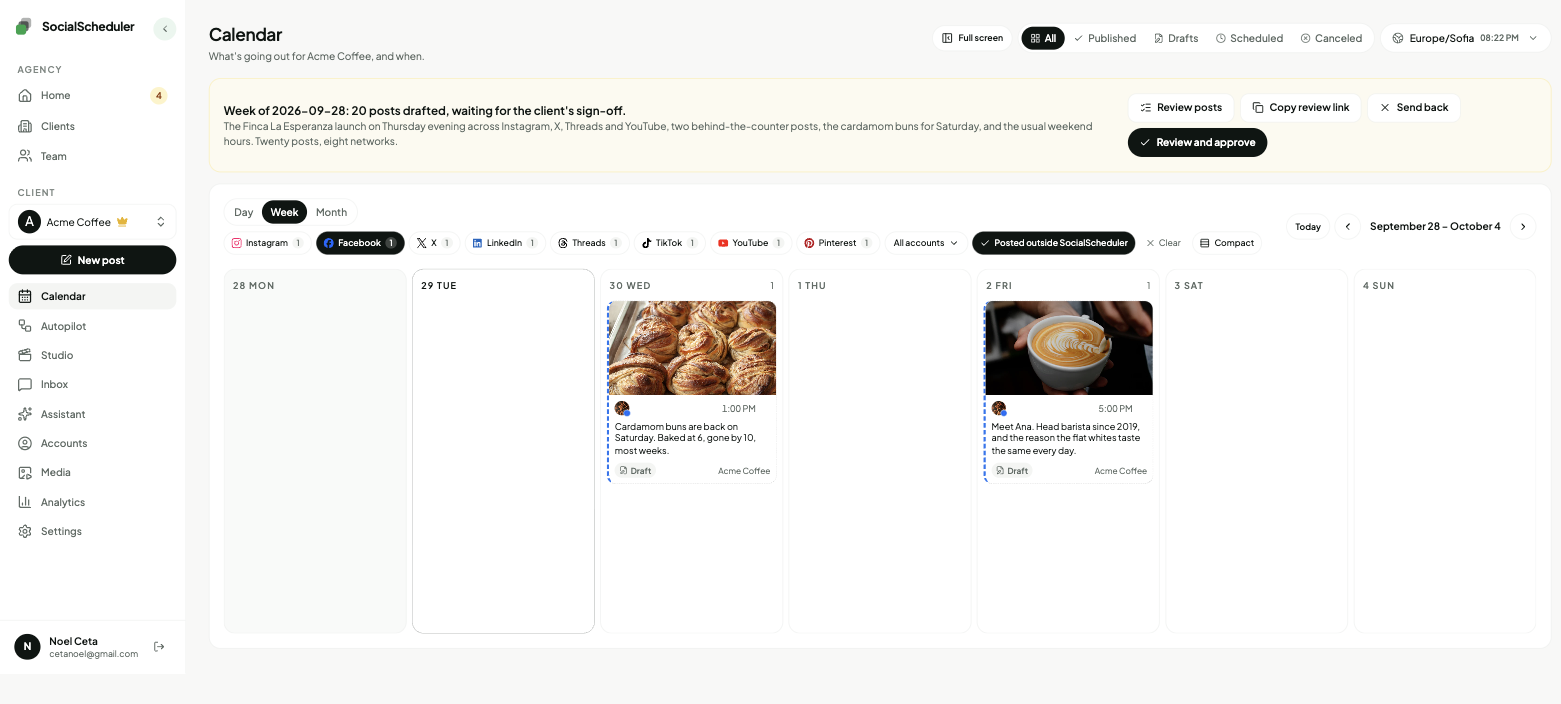
Planned Sunday. Waiting for approval.
- Tue12:30PhotoThe autumn roast is on the bar from today. Chocolate, plum, a long finish.
- Wed09:00LinkWhy we pay the farms behind this roast above the Fairtrade floor.
- Thu13:00PhotosFive steps to a better pour-over at home. Start with the grind.
- Fri17:30VideoBehind the counter on a Friday rush.
You choose who says yes.
Per client. Change it any time. Your team can pull any Facebook post until it goes out.
Agency reviews
DefaultYour team approves the week in the app. Nothing goes out before.
Client signs off
Most usedThe client gets an email link. They approve or comment. No login.
Review link · no login needed
Dana (Acme) · approved Mon 10:12
Full autopilot
For trusted clientsNo approval step. It plans and posts. Everyone gets a Monday report.
Client report every Monday, 9:00
Pause any time, pull any post
Pages, profiles and groups: what can be scheduled
Meta only lets outside apps publish to Facebook Pages. Personal profiles lost third-party posting in 2018, and Meta removed the Groups API on April 22, 2024, so no scheduling tool can post to a group through an official API. Tools that claim groups or profiles do it with reminders you finish by hand or with browser automation.
SocialScheduler connects the Pages you manage for each client through Facebook login, with the pages_manage_posts permission. It never asks for a password and never drives a browser. If a client needs posts in their own group, an admin can still schedule them in Facebook itself.
- Facebook Page: scheduled and posted automatically
- Personal profile: not supported by Meta's API
- Facebook group: not supported since April 2024
Link posts and previews
A link post is still the most direct way to send Page followers to a menu, a product or an article. The AI writes a short intro that says why the link matters, puts the link in the post, and Facebook builds the preview card from the linked page's title and image tags. If the card looks wrong, fix the tags on the website, not the post.
Meta has been testing a cap on link posts. In the test, some Pages and professional profiles without Meta Verified can share only two links a month in the post body. Links in comments do not count (Social Media Examiner, February 2026). It is a test, not a rule for every Page, so check the client's Page if link posts stop going through.
How the agency workflow runs
Each client has a brief: voice, offers, links, topics to avoid. On Sunday the AI plans the client's week across every network they use and writes the Facebook posts in the client's voice, with the photos, slides and videos they need.
Then someone says yes. Your team approves in the app, or the client opens an email link to the week and approves, comments or asks for a change without a login. Clients you trust can run on autopilot. On Monday each client gets a report under your agency's name.
- Sunday: the week is planned and drafted
- Review: your team or the client approves from a link
- During the week: posts go out at each client's best hours
- Monday: a report under your agency's name
The best time to post on Facebook
The big studies agree that weekdays beat weekends and disagree on the hour. Sprout Social's March 2026 report (nearly 2 billion engagements, local time) puts the peaks on Tuesday and Wednesday from noon to 8 p.m. Buffer's February 2026 study of 14 million Facebook posts names Thursday at 9 a.m. as the top slot, with weekday mornings ahead of afternoons and Saturday weakest.
Averages are a starting point. A restaurant's followers and a law firm's followers are online at different hours. SocialScheduler looks at when each client's audience is online and how their past posts did, and schedules each post for that client's best hour. You can move any post.
Is there a free Facebook scheduler?
Yes. Meta Business Suite schedules posts, Reels and Stories for your own Pages at no cost, about 29 days ahead in 2026. It covers Facebook and Instagram only and has no client approval step. SocialScheduler's free plan covers one client with up to 3 connected accounts and 20 AI credits a month, and publishing never costs credits. A planned week costs 10 credits. For more clients, Business is $49 a month for 5 clients and Agency is $149 a month for 15, with 20% off yearly.
One plan, every network.
Each client's week is written once, then sized for every network they are on.
- Facebook schedulerThis page
- Instagram scheduler
- LinkedIn scheduler
- Threads scheduler
- TikTok scheduler
- X scheduler
- YouTube scheduler
- Pinterest scheduler
- Bluesky scheduler
- Mastodon scheduler
- Telegram scheduler
- Discord scheduler
- Slack scheduler
Also publishes to Reddit, Google Business Profile, Dev.to, Hashnode, WordPress, ListMonk and Lemmy.
Facebook questions, answered.
Yes, on Pages. Meta Business Suite schedules Page posts for free, and tools like SocialScheduler schedule them through Meta's official API. Personal profiles and groups cannot be scheduled by outside apps.
One that handles many clients' Pages without extra logins. SocialScheduler plans and writes each client's week, lets clients approve from an email link with no login, and sends a Monday report under your agency's name.
Yes. Meta Business Suite is free for your own Pages. SocialScheduler also has a free plan: one client, 3 accounts and 20 AI credits a month, and publishing never uses credits.
Not with SocialScheduler or any tool that uses the official API. Meta removed third-party posting to personal profiles in 2018. Connect the client's Facebook Page instead.
Not through a third-party tool. Meta shut down the Groups API on April 22, 2024. Group admins can still schedule posts inside Facebook.
Meta Business Suite and the Pages API allow about 30 days ahead. SocialScheduler holds the post itself and publishes it at the planned hour, and it plans one week at a time.
It posts short vertical videos to the Page, with captions and a voiceover. It does not use the separate Reels publishing flow and does not post Stories.
Short enough that the point shows before "See more". Facebook allows 63,206 characters, but desktop feeds fold the text after about 477 characters and mobile much sooner, so the AI puts the point in the first line.
Weekdays. Sprout Social (March 2026) found Tuesday and Wednesday from noon to 8 p.m. strongest, and Buffer (February 2026) found Thursday at 9 a.m. The best hour for one Page depends on when its followers are online, which is what SocialScheduler uses.
Yes. If the client's Instagram professional account is linked to their Page, it connects through the same Facebook login.
Yes. The client gets an email link with the week and can approve, comment or ask for a change. No login. Or your team approves, or you turn on autopilot for clients you trust.
Yes. SocialScheduler only uses official APIs. No browser automation, no shared passwords.
Facts on this page reviewed
Start with one client.
Ten minutes to set up. The first week is planned right away.
Comments and Messenger in one inbox
Comments on each client's Page and Messenger conversations land in one inbox with their Instagram, Threads, X, YouTube and Bluesky messages. Replies are drafted in the client's voice, and your team sends them.
Keyword rules handle the repeats. Pick a word, and when someone comments it the rule can reply in public, like the comment, or send the person a private message with a link or a lead magnet. A cafe can answer every "menu" comment with the menu link while the team is asleep.