The Threads scheduler that plans, writes and posts for your clients.
SocialScheduler plans each client's Threads week, writes short posts that start a conversation and designs the images and carousels. You or the client approve, and replies come back to one inbox.
A Threads scheduler publishes Threads posts at a time you choose, without anyone opening the app. SocialScheduler is a Threads scheduler for agencies: its AI plans each client's week, writes each post under 500 characters in the client's voice, designs images and carousels, and publishes through the official Threads API once you or the client approve.
Free for one client. No credit card.
Threads scheduling at a glance
- Post length
- 500 characters; a text attachment can add up to 10,000 more (Threads, September 2025)
- Topic tags
- 1 per post, up to 50 characters (Threads API docs)
- Carousels
- 2 to 20 images or videos per post through the API
- Video
- Up to 5 minutes, MP4 or MOV, 1 GB (Threads API docs)
- Native scheduling
- In the Threads app since January 2025, up to 75 days ahead
- Best times
- Weekday mornings, Tuesday to Thursday; Thursday 9 a.m. tops (Buffer, February 2026)
- Free plan
- 1 client, 3 accounts, 20 AI credits a month
- Checked
- September 2026
Every Threads format your clients use.
Planned on Sunday with the rest of the week. Written in the client's voice. Designed in their brand.
Text posts
Under 500 characters, in the first person, written to start a conversation.
Images and video
A photo, an image the AI designs, or an MP4 or MOV from the client's library.
Carousels
3 to 6 slides designed by the AI in the client's brand, posted as one swipeable post.
Replies
In the inbox with the client's other networks, with a reply drafted in the client's voice.
How the AI writes for Threads.
The limits and habits of the network are built in. Every post is checked against them before it is scheduled.
- 500 characters per post, counted before it is scheduled
- Conversational, in the first person
- At most one topic tag
- Questions that invite replies
- At most two carousels a week
- Posted at the client's best hour
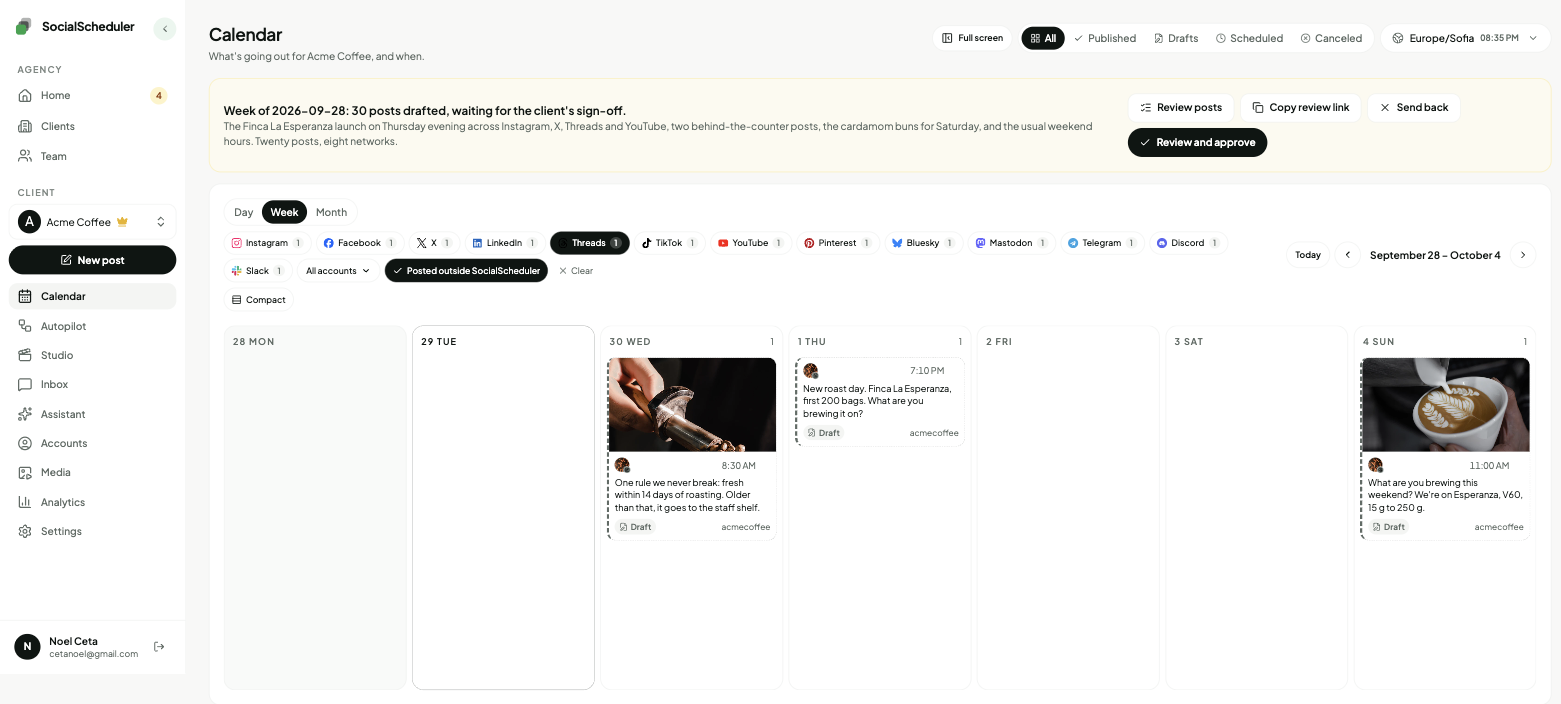
Planned Sunday. Waiting for approval.
- Tue08:30TextOne rule we never break: fresh within 14 days of roasting.
- Wed12:00ImageThe autumn roast is in. What should we call it?
- Thu09:00CarouselThree roasts, three mornings. Which one are you?
You choose who says yes.
Per client. Change it any time. Your team can pull any Threads post until it goes out.
Agency reviews
DefaultYour team approves the week in the app. Nothing goes out before.
Client signs off
Most usedThe client gets an email link. They approve or comment. No login.
Review link · no login needed
Dana (Acme) · approved Mon 10:12
Full autopilot
For trusted clientsNo approval step. It plans and posts. Everyone gets a Monday report.
Client report every Monday, 9:00
Pause any time, pull any post
Why Threads matters for agencies now
Threads passed 500 million monthly users in June 2026, according to Meta. It started as a text-first rival to X in July 2023 and opened its API to scheduling tools in June 2024. For most brands it is now a channel their audience already uses, often without the brand being there.
For an agency, Threads is cheap to add. The posts are short, they reuse the ideas in the client's weekly plan, and most accounts sign in with the client's Instagram profile. The hard part is showing up every week in the right voice and answering replies. That is the part SocialScheduler takes off your plate.
Short posts that start a conversation
Threads rewards replies more than polish. A post that asks a real question, takes a position or shares a small behind-the-scenes detail tends to pull people into the conversation. A caption copied from Instagram usually does not.
So SocialScheduler starts from the same weekly plan but writes a separate Threads version: shorter than a caption, in the first person, under 500 characters, with at most one topic tag. Some posts carry an image or a carousel of 3 to 6 slides the AI designs in the client's colors and fonts. You can also attach a photo or a video from the client's media library.
Replies, in one inbox
On Threads the replies are the point. SocialScheduler pulls replies to each client's recent posts into one inbox with their Instagram, Facebook, X, YouTube and Bluesky comments, and drafts an answer in the client's voice for you to send or edit.
Keyword rules handle the repeat work. When someone replies with a word you choose, a rule can answer publicly, for example with a link to a guide or a lead magnet, or repost the mention. Threads has no direct messages in its API, so nothing is sent privately there.
What an agency week looks like
Each client has a brief: voice, offers, topics to avoid, links. On Sunday the AI plans the client's week across every network they use and writes each Threads post for Threads, not as a copy of another network's post.
Then someone says yes. Your team approves in the app, or the client gets an email link to the week and approves, comments or asks for a change without a login. Clients you trust can run on autopilot. On Monday each client gets a report under your agency's name.
- Sunday: the week is planned and drafted
- Review: your team or the client approves from a link
- During the week: posts go out at each client's best hours
- Monday: a report under your agency's name
The best time to post on Threads
Buffer's February 2026 study of 2.5 million Threads posts found weekday mornings strongest. Thursday at 9 a.m. led, followed by Wednesday at noon and Wednesday at 9 a.m. Saturday and Sunday were weakest, and evenings from 6 to 11 p.m. underperformed every day of the week.
Averages are a starting point. A local bakery's followers and a B2B consultant's followers are online at different hours. SocialScheduler looks at when each client's audience is online and how past posts did, and schedules each post for that client's best hour. You can move any post.
Is there a free Threads scheduler?
Yes. Since January 2025 the Threads app schedules posts up to 75 days ahead for one account, which is enough for a single brand. SocialScheduler's free plan covers one client with up to 3 connected accounts and 20 AI credits a month, and publishing never costs credits. A planned week costs 10 credits. When you add clients, Business is $49 a month for 5 clients and Agency is $149 a month for 15, with 20% off yearly.
One plan, every network.
Each client's week is written once, then sized for every network they are on.
- Threads schedulerThis page
- Instagram scheduler
- X scheduler
- Bluesky scheduler
- TikTok scheduler
- Facebook scheduler
- LinkedIn scheduler
- YouTube scheduler
- Pinterest scheduler
- Mastodon scheduler
- Telegram scheduler
- Discord scheduler
- Slack scheduler
Also publishes to Reddit, Google Business Profile, Dev.to, Hashnode, WordPress, ListMonk and Lemmy.
Threads questions, answered.
Yes. The Threads app has scheduled posts up to 75 days ahead since January 2025. Tools like SocialScheduler schedule them through the official Threads API, which opened to developers in June 2024.
One that handles many clients without extra logins. SocialScheduler plans and writes each client's Threads week, lets clients approve from an email link with no login, and sends a Monday report under your agency's name.
Yes. The Threads app schedules posts for free. SocialScheduler's free plan covers one client with 3 accounts and 20 AI credits a month, and publishing never uses credits.
500 characters. Since September 2025 a text-only post can also carry a text attachment of up to 10,000 characters. SocialScheduler writes posts under 500 characters and counts each one before it is scheduled.
Yes. The Threads API accepts carousels of 2 to 20 images or videos and videos up to 5 minutes. SocialScheduler designs carousels of 3 to 6 slides and publishes images, carousels and MP4 or MOV videos from the client's library.
A post published through the official API is a normal Threads post. Reach depends on the content and the hour, which is why each post goes out when the client's audience is online.
Weekday mornings, Tuesday to Thursday, with Thursday at 9 a.m. on top in Buffer's February 2026 study of 2.5 million posts. Weekends and evenings were weakest. The best hour for one account depends on when its followers are online.
Posts scheduled in the Threads app sit in your drafts. Posts scheduled in SocialScheduler stay in its calendar until they publish, so they do not appear in the app beforehand.
Yes, with keyword rules. When a reply contains a word you choose, SocialScheduler can answer publicly or repost it. Threads has no DMs in its API, so there are no private replies there.
No. It starts from the same weekly plan, then writes for Threads: shorter than an Instagram caption, more of a conversation, with at most one topic tag.
Yes. SocialScheduler only uses official APIs. No browser automation, no shared passwords.
Yes. The client gets an email link with the week and can approve, comment or ask for a change. No login. Or your team approves, or you turn on autopilot for clients you trust.
Facts on this page reviewed
Start with one client.
Ten minutes to set up. The first week is planned right away.