The YouTube scheduler for agency teams: videos and Shorts on every client's channel.
Upload each client's videos with the title, description, privacy and audience settings YouTube asks for, and publish them at the hour you pick. Build Shorts from the client's own photos and clips, with captions and an AI voiceover, in the same calendar as the rest of their week.
A YouTube scheduler uploads a video and publishes it at a time you choose, without anyone sitting in YouTube Studio. SocialScheduler is a YouTube scheduler for agencies: it uploads each client's videos and Shorts through the official YouTube Data API with the title, description, category, privacy, made-for-kids and AI-disclosure settings you pick, and brings the channel's comments into one inbox.
Free for one client. No credit card.
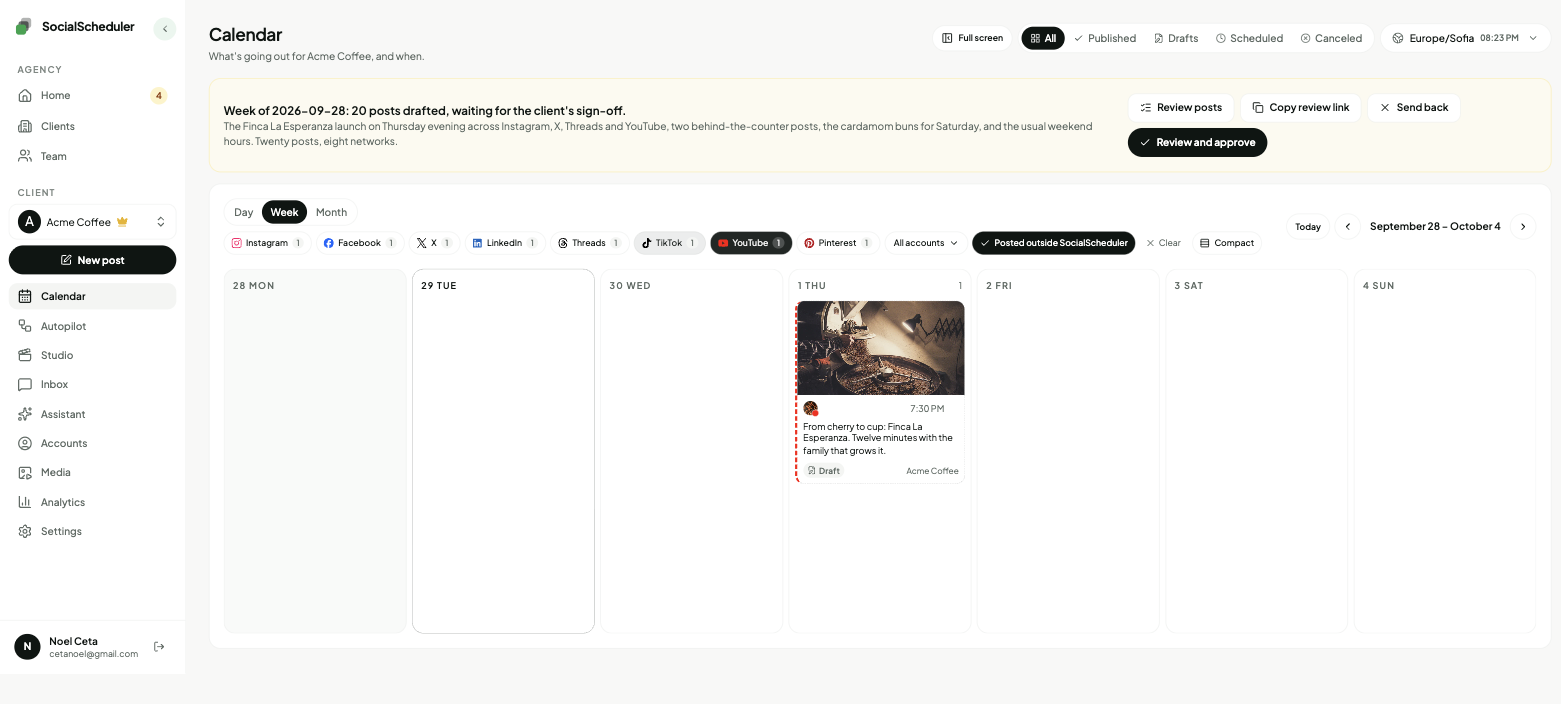
YouTube scheduling at a glance
- Title
- Up to 100 characters (YouTube Data API)
- Description
- Up to 5,000 bytes, about 5,000 characters of plain English (YouTube Data API, September 2026)
- Shorts
- Square or vertical, up to 3 minutes, for uploads since October 15, 2024 (YouTube Help)
- Uploads here
- One video per post, up to 100 MB; Shorts built here run 6 to 60 seconds
- YouTube Studio's scheduler
- Free; the video stays private and goes public at the set time, one upload at a time
- API quota
- Google caps uploads per app: 100 a day by default (YouTube Data API quota page, September 2026)
- Best times
- Long videos: weekdays 2 to 4 p.m.; Shorts: 12 to 3 p.m. and 7 to 9 p.m., audience time (SocialPilot 2026)
- Free plan
- 1 client, 3 accounts, 20 AI credits a month; publishing never costs credits
Every YouTube format your clients use.
Added from the composer to the same calendar as every other network. Written in the client's voice, with the title and description the upload needs.
Video uploads
The client's own video, with a title of up to 100 characters and a description.
Shorts
Vertical, 6 to 60 seconds, built from the client's photos and clips with captions and an optional AI voiceover.
Upload settings
Public, unlisted or private, made for kids or not, and the AI disclosure, chosen per upload.
Comments
In the inbox next to the client's other networks, with replies and keyword rules.
How the AI writes for YouTube.
The limits and habits of the network are built in. Every post is checked against them before it is scheduled.
- Title up to 100 characters
- Description up to 5,000 characters
- One video per upload, up to 100 MB
- Shorts vertical or square, 60 seconds or less
- Privacy, audience and AI disclosure chosen for every upload
Planned Sunday. Waiting for approval.
- Tue12:00ShortEspresso or ristretto, in 30 seconds.
- Thu15:00VideoWe visited the farm behind our autumn roast.
- Fri18:00ShortLatte art, attempt number 40.
You choose who says yes.
Per client. Change it any time. Your team can pull any YouTube post until it goes out.
Agency reviews
DefaultYour team approves the week in the app. Nothing goes out before.
Client signs off
Most usedThe client gets an email link. They approve or comment. No login.
Review link · no login needed
Dana (Acme) · approved Mon 10:12
Full autopilot
For trusted clientsNo approval step. It plans and posts. Everyone gets a Monday report.
Client report every Monday, 9:00
Pause any time, pull any post
Video uploads and Shorts: what you can schedule
YouTube has one upload for both. Since October 15, 2024, any square or vertical video up to 3 minutes long becomes a Short; anything wider or longer is a regular video. There is no separate Shorts button in the API.
In SocialScheduler, a video upload is the client's own file, one per post, up to 100 MB. That covers most Shorts, trailers and clips; a long, high-bitrate episode may be bigger and is better uploaded in YouTube Studio.
Shorts can also be built in the app. Pick 1 to 6 of the client's approved photos or clips, write up to 8 caption lines, add an AI voiceover if you want one, and it renders a vertical video of 6 to 60 seconds with the captions burned in. A 30-second Short with a voiceover costs 9 AI credits. SocialScheduler does not post community posts, playlists or live streams.
How YouTube fits the agency workflow
Each client has a brief: voice, offers, topics to avoid, links. Every Sunday the AI plans and writes the week for the client's other networks, and you or the client approve it, the client from an email link without a login. YouTube is the exception on purpose: the AI does not plan or produce YouTube uploads on its own, because a good video needs the client's real footage.
So YouTube uploads are scheduled by your team, in the same calendar as the planned week, and a Short can reuse the week's photos and clips. On Monday the client gets a report under your agency's name.
- Sunday: the week is planned for the client's other networks
- Review: your team or the client approves from a link
- Your team adds the week's YouTube videos and Shorts to the same calendar
- Monday: a report under your agency's name
YouTube comments in the inbox
Comments and replies on the client's videos land in the SocialScheduler inbox, next to Instagram, Facebook, Threads, X and Bluesky. Your team can answer from there without opening each channel.
Keyword rules work on YouTube comments too. When a comment contains a word you choose, such as "price" or "recipe", the rule can post a reply. YouTube has no direct messages, so lead magnets sent by DM and auto-likes are not available on YouTube; they work on the networks that support them.
The best time to post on YouTube
SocialPilot's 2026 study of 301,000 videos from more than 27,000 channels found long videos do best on weekdays from 2 to 4 p.m. in the audience's time zone, with Wednesday to Friday strongest. Shorts peak at midday, 12 to 3 p.m., and again from 7 to 9 p.m. The weakest slots were before 9 a.m. on weekdays and after 10 p.m.
Two things change the picture. YouTube keeps recommending a video for weeks, so the hour matters less than on X or Threads. And the hour belongs to the audience, not the uploader: a channel whose viewers are in Europe needs a different slot from one in California. Start with the studies, then check the client's YouTube Analytics and move the slot.
YouTube Studio's scheduler, API limits and the free plan
YouTube Studio schedules for free: upload the video, choose Schedule, and it stays private until the time you set. It works one channel and one upload at a time, with no approvals or view of other networks. For one creator that is enough. For an agency with several client channels, a scheduling tool keeps the logins, the calendar and the comments in one place.
Tools that upload through the API share Google's quota, which by default allows 100 uploads a day per app. If it runs out, SocialScheduler waits and retries. SocialScheduler's free plan covers 1 client, 3 accounts and 20 AI credits a month. Business is $49 a month for 5 clients and Agency is $149 for 15, with 20% off yearly.
One plan, every network.
Each client's week is written once, then sized for every network they are on.
- YouTube schedulerThis page
- TikTok scheduler
- Instagram scheduler
- Pinterest scheduler
- X scheduler
- Threads scheduler
- Facebook scheduler
- LinkedIn scheduler
- Bluesky scheduler
- Mastodon scheduler
- Telegram scheduler
- Discord scheduler
- Slack scheduler
Also publishes to Reddit, Google Business Profile, Dev.to, Hashnode, WordPress, ListMonk and Lemmy.
YouTube questions, answered.
Yes. In YouTube Studio, upload the video, choose Schedule under visibility, and it goes public at the time you set. A scheduling tool like SocialScheduler uploads through the official API at the time you pick, for many client channels at once.
Yes. A Short is uploaded like any video, so YouTube Studio and scheduling tools can schedule it. SocialScheduler can also build the Short from the client's photos and clips, with captions and an AI voiceover.
Up to 3 minutes, as long as the video is square or vertical; YouTube raised the limit from 60 seconds on October 15, 2024. Shorts built in SocialScheduler run 6 to 60 seconds.
A title can be 100 characters and a description 5,000. Keep the topic at the start of the title and put the key point in the first lines of the description, since that is what shows before "more".
For long videos, weekdays from 2 to 4 p.m. in the audience's time zone, with Wednesday to Friday strongest, according to SocialPilot's 2026 study of 301,000 videos. Check the client's own YouTube Analytics and adjust.
Midday, 12 to 3 p.m., and early evening, 7 to 9 p.m., in the audience's time zone, per the same 2026 study. Shorts can resurface for days, so a steady schedule matters more than the exact hour.
Yes. Every upload asks for public, unlisted or private, whether the video is made for kids, and whether it has realistic AI-altered content. You can save them as the channel's defaults, but an upload without them is refused.
YouTube restricts videos uploaded by apps that have not passed Google's verification and audit to private. SocialScheduler's Google verification was not yet complete in September 2026, so check the video's visibility in YouTube Studio after it posts.
Yes. The client's YouTube comments show in the inbox with their other networks, and you can reply there or let a keyword rule reply for you.
Yes. YouTube Studio's scheduler is free for one channel. SocialScheduler's free plan covers 1 client with 3 accounts and 20 AI credits a month, and publishing never uses credits.
Yes. SocialScheduler only uses official APIs. No browser automation, no shared passwords.
Yes. Uploads and Shorts sit on the same calendar as every other post, so your team approves them in the app before they publish, and each upload can start as private or unlisted. The weekly client review link covers the posts the agent planned.
Facts on this page reviewed
Start with one client.
Ten minutes to set up. The first week is planned right away.