Schedule Discord messages for every client's community.
SocialScheduler writes each client's Discord announcements in their voice and posts them to the channel you pick, through a webhook. The client approves from an email link, and nobody has to be online when the message goes out.
Discord has no built-in way to schedule a message; its Scheduled Events only announce an event. To schedule Discord messages you need a bot or a webhook tool. SocialScheduler uses a channel webhook: you paste its URL once, the AI writes each client's announcements (up to 2,000 characters, with images), the client approves from an email link, and each message posts at the planned time.
Free for one client. No credit card.
Discord scheduling at a glance
- Native scheduling
- None for messages; Scheduled Events announce events only (Sept 2026)
- Connection
- One channel per incoming webhook; needs the Manage Webhooks permission
- Text
- Up to 2,000 characters per message (Discord API)
- Media
- Up to 10 images (JPEG, PNG, GIF, WebP) or one MP4/MOV video, 8 MB per file
- Formatting
- Discord Markdown: bold, italics, headers, lists, masked links
- Mentions
- @everyone, @here and role mentions show as text and never ping
- Discord audience
- 90M+ daily active users (Discord, Q4 2025)
- Price
- Free for 1 client; Business $49/mo; Agency $149/mo
Every Discord format your clients use.
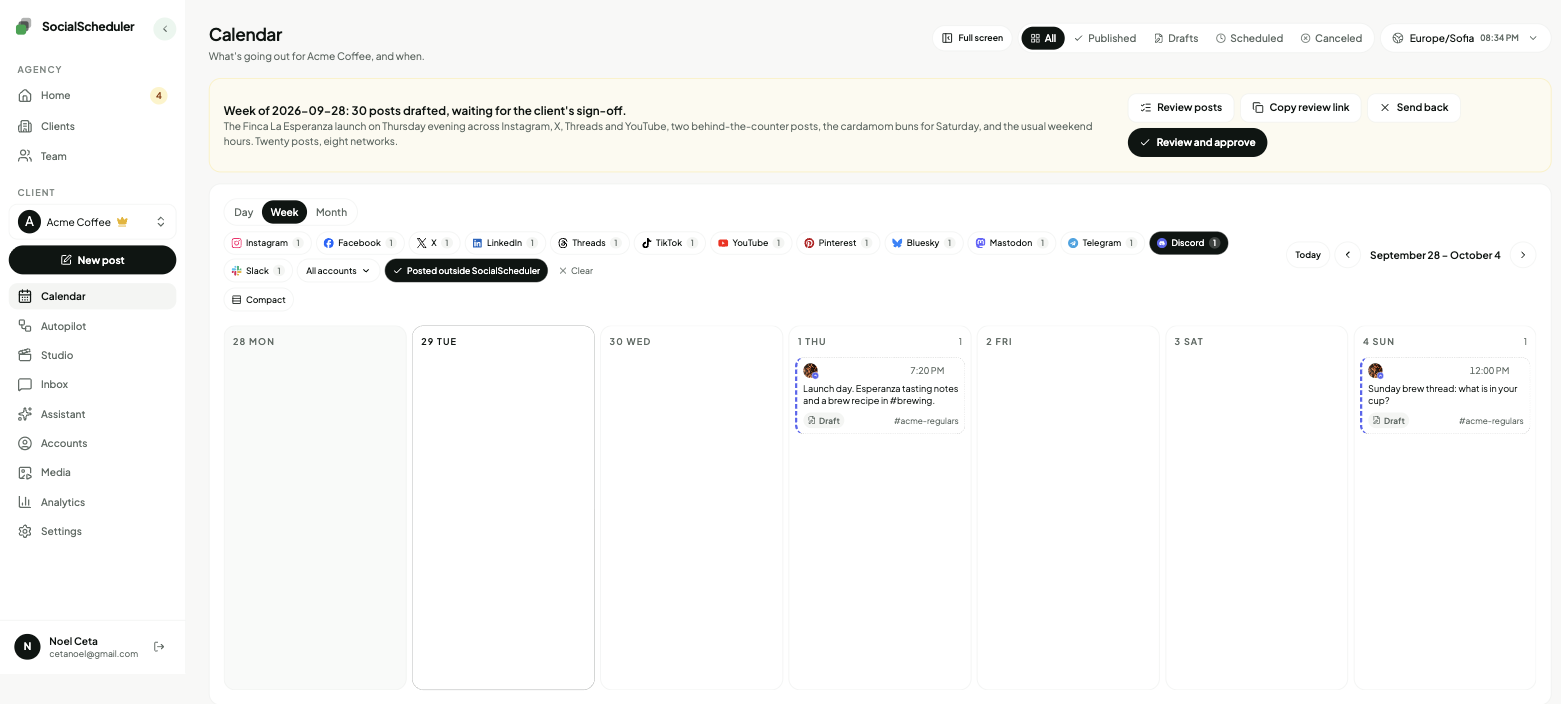
Text and image posts are planned on Sunday with the rest of the week, in the client's voice. Video posts are added from the composer.
Text announcements
Up to 2,000 characters in Discord Markdown, written for the community, not copied from the feed.
Image posts
Up to 10 JPEG, PNG, GIF or WebP images with the message, 8 MB each. Photos from the client's library or images the AI designs.
Video posts
One MP4 or MOV file up to 8 MB, added from the composer. Images and video are not mixed in one message.
Channels
Each webhook posts to one channel. Connect another webhook for each further channel.
How the AI writes for Discord.
The limits and habits of the network are built in. Every post is checked against them before it is scheduled.
- Up to 2,000 characters
- Posted through a channel webhook
- Up to 10 images or one video, 8 MB each
- No hashtags; Discord Markdown instead
- Mentions never ping anyone
- Posted at the time in the plan
Planned Sunday. Waiting for approval.
- Mon10:00TextNew roast drop: the autumn roast ships Thursday.
- Wed18:00ImageLatte art contest: post your best pour in #show-and-tell this week.
- Fri12:00TextThis week's winners, and next week's theme.
You choose who says yes.
Per client. Change it any time. Your team can pull any Discord post until it goes out.
Agency reviews
DefaultYour team approves the week in the app. Nothing goes out before.
Client signs off
Most usedThe client gets an email link. They approve or comment. No login.
Review link · no login needed
Dana (Acme) · approved Mon 10:12
Full autopilot
For trusted clientsNo approval step. It plans and posts. Everyone gets a Monday report.
Client report every Monday, 9:00
Pause any time, pull any post
Can you schedule messages on Discord?
Not natively. Discord has never shipped a "send later" button for messages, and requests for one have sat on its feedback forum for years. Scheduled Events are a different thing: they announce a voice, stage or off-Discord event and let members click Interested. They do not post a message for you.
So people schedule Discord messages with outside tools. Scheduling bots such as Message Scheduler or MsgPlanner run slash commands inside the server. Zapier can send a message on a timer. Embed tools such as Embed Generator send a saved message once for free and charge for repeats. SocialScheduler takes the webhook route and adds what an agency needs: the AI writes the posts, the client approves them, and Discord sits on the same calendar as the client's other networks.
Why brands run Discord communities, and what to post there
Discord reports more than 90 million daily active users (Q4 2025), and a server is the one place a brand owns the room: no algorithm decides who sees a post, and members come back on their own. Games, creators, software, coffee roasters and fitness studios use it for fans who want more than a feed.
A server has two kinds of channels, and they need different writing. An announcements channel carries the news: a launch, a drop, an event, the week's recap. It should be short, clear and scheduled, because Discord is chronological and a post buried under chat is a post nobody reads. Conversation channels belong to members and the team. SocialScheduler writes and schedules the announcements; the conversation stays human, and there is no Discord inbox.
Set up the Discord webhook in two minutes
A webhook is Discord's own low-effort way to post into a channel. It needs no bot user and no OAuth login, and it can only post. Anyone with the Manage Webhooks permission on the channel can create one.
- In Discord, open the channel's settings (the gear next to its name), then Integrations, then Webhooks, then New Webhook.
- Give the webhook a name and a picture. Posts appear under that name and avatar.
- Click Copy Webhook URL.
- In SocialScheduler, add Discord to the client, paste the URL and type a label such as #announcements.
- Keep the URL private. Anyone who has it can post to the channel. If it leaks, delete the webhook in Discord and connect a new one.
Formatting and media on Discord
Discord renders its own Markdown: **bold**, *italics*, # headers, bullet lists, > quotes and masked links written as [text](url). The AI uses it the way a good community manager would: a bold first line, a short list when there are several details, one link. Hashtags do nothing on Discord, so there are none. Pasted @everyone, @here and role mentions are sent as plain text and never ping members, so a draft cannot wake up a whole server by mistake.
A message holds up to 2,000 characters. Media is up to 10 images or one video per message, each file within 8 MB, which fits every server whatever its Boost level. Webhooks are rate limited per channel, which never matters for a planned week. What we do not send: embeds, polls, buttons, thread or forum posts, and edits after posting.
The agency workflow on Discord
Each client starts with a brief: what they sell, who is in the server, the words they use and the ones they avoid. You connect the client's announcement channel once with its webhook.
On Sunday the AI plans the client's week across every network they use, and writes the Discord posts as community announcements, not copies of the Instagram caption. You choose who approves, per client: your team in the app, the client from an email link with no login, or autopilot for clients you trust. Every Monday the client gets a report under your agency's name. One limit to know: a webhook cannot read reactions or views, so Discord results do not come back into the report or the next plan.
The free plan covers one client and three accounts with 20 AI credits a month; a planned week uses 10 and publishing is free. Business is $49 a month for five clients, Agency $149 for fifteen.
The best time to post on Discord
No large study covers Discord posting times the way Sprout Social or Hootsuite cover Instagram and LinkedIn, so be wary of any guide that names a universal hour. What does hold: a channel is chronological, so an announcement does best when members are online and chat is not racing past it. In a small server timing matters little. In a busy one, a post from eight hours ago is already buried.
Start from the client's audience: their time zone and when they are off work or school, often late afternoon and evening for games and hobbies, and working hours for software and B2B communities. Community servers can check Server Insights for when members visit and talk. Weekly is the rhythm most servers keep: two or three announcements, each worth reading, rather than one every hour.
One plan, every network.
Each client's week is written once, then sized for every network they are on.
- Discord schedulerThis page
- Telegram scheduler
- Slack scheduler
- Mastodon scheduler
- Instagram scheduler
- TikTok scheduler
- X scheduler
- Threads scheduler
- Facebook scheduler
- LinkedIn scheduler
- YouTube scheduler
- Pinterest scheduler
- Bluesky scheduler
Also publishes to Reddit, Google Business Profile, Dev.to, Hashnode, WordPress, ListMonk and Lemmy.
Discord questions, answered.
Not with Discord alone. It has no send-later feature for messages, and Scheduled Events only announce events. You need a scheduling bot, an automation tool or a webhook scheduler such as SocialScheduler.
Create a webhook in the channel's settings (Integrations, then Webhooks), paste its URL into a scheduler, write the message and pick a time. SocialScheduler also writes the message and gets it approved before it posts.
For recurring reminders, a scheduling bot inside the server works well. For planned announcements written in a brand's voice, connect the channel's webhook to SocialScheduler and it posts each week's plan at the set times.
Yes. A webhook posts to one channel without a bot user, so nothing needs to join the server or hold permissions. It can only post, which is all a scheduled announcement needs.
Open the channel's settings, go to Integrations, then Webhooks, and click New Webhook. Name it, add a picture, and click Copy Webhook URL. You need the Manage Webhooks permission.
2,000 characters per message, and webhooks have the same limit. SocialScheduler checks every Discord post against it before it is scheduled.
Yes. Up to 10 JPEG, PNG, GIF or WebP images, or one MP4 or MOV video, each file up to 8 MB. Images and video are not mixed in one message.
Each webhook posts to one text or announcement channel, so connect one webhook per channel. Posting into threads or forum channels is not supported.
No. SocialScheduler sends every Discord message with mentions switched off, so @everyone, @here, role and user mentions show as text and never notify anyone.
Several bots have free tiers for simple reminders. SocialScheduler's free plan covers one client with up to three accounts and 20 AI credits a month, enough for two planned weeks, and publishing never costs credits.
Yes. SocialScheduler only uses official APIs. No browser automation, no shared passwords.
Yes. The client gets an email link with the week and can approve, comment or ask for a change. No login. Or your team approves, or you turn on autopilot for clients you trust.
Facts on this page reviewed
Start with one client.
Ten minutes to set up. The first week is planned right away.