The Telegram scheduler that writes and posts to your clients' channels.
SocialScheduler plans each client's Telegram channel week, writes the posts in their voice and adds the images. It publishes through a bot the client adds as a channel admin, at the hours their subscribers read.
A Telegram scheduler publishes posts to a Telegram channel at a set time, so nobody has to be online to send them. SocialScheduler is a Telegram scheduler for agencies: its AI plans each client's week, writes the channel posts in the client's voice and designs the images, then posts text, photos, albums of up to 10 images and video through the official Bot API once you or the client approve. It posts to channels, not groups or private chats.
Free for one client. No credit card.
Telegram scheduling at a glance
- Where it posts
- Telegram channels, public or private, through a bot that is a channel admin with "Post messages"
- Text
- Up to 4,096 characters per message, plain text with link previews
- Media
- One photo, an album of 2 to 10 photos (10 MB each), or one video up to 50 MB, the Bot API upload limit
- Captions
- 1,024 characters on media; longer text goes out as a second message right after it
- Native scheduling
- Free in the Telegram app: hold Send, pick a time, up to 365 days ahead and 100 scheduled messages per chat
- Audience
- Over 1 billion monthly active users (Telegram, 2026); channels have no subscriber cap, groups hold up to 200,000 members
- Free plan
- 1 client, 3 accounts, 20 AI credits a month; publishing never uses credits
- Checked
- September 2026 (Bot API 10.3)
Every Telegram format your clients use.
Planned on Sunday with the rest of the week. Written in the client's voice. Designed in their brand.
Text posts
Up to 4,096 characters of plain text with links. Room for a full update, a digest or a short guide.
Photo posts
One image the AI designs in the client's brand, or a photo from their library, with a caption up to 1,024 characters.
Albums
2 to 10 photos sent as one post and one notification. The caption sits on the first photo.
Video
One video up to 50 MB, added from the media library, with the text as its caption.
How the AI writes for Telegram.
The limits and habits of the network are built in. Every post is checked against them before it is scheduled.
- Channels only, posted by the client's bot
- Up to 4,096 characters, the point in line one
- Captions over 1,024 go out as a second message
- Plain text and links, no hashtags
- Photos or one video, never mixed
- Posted at the client's best hour
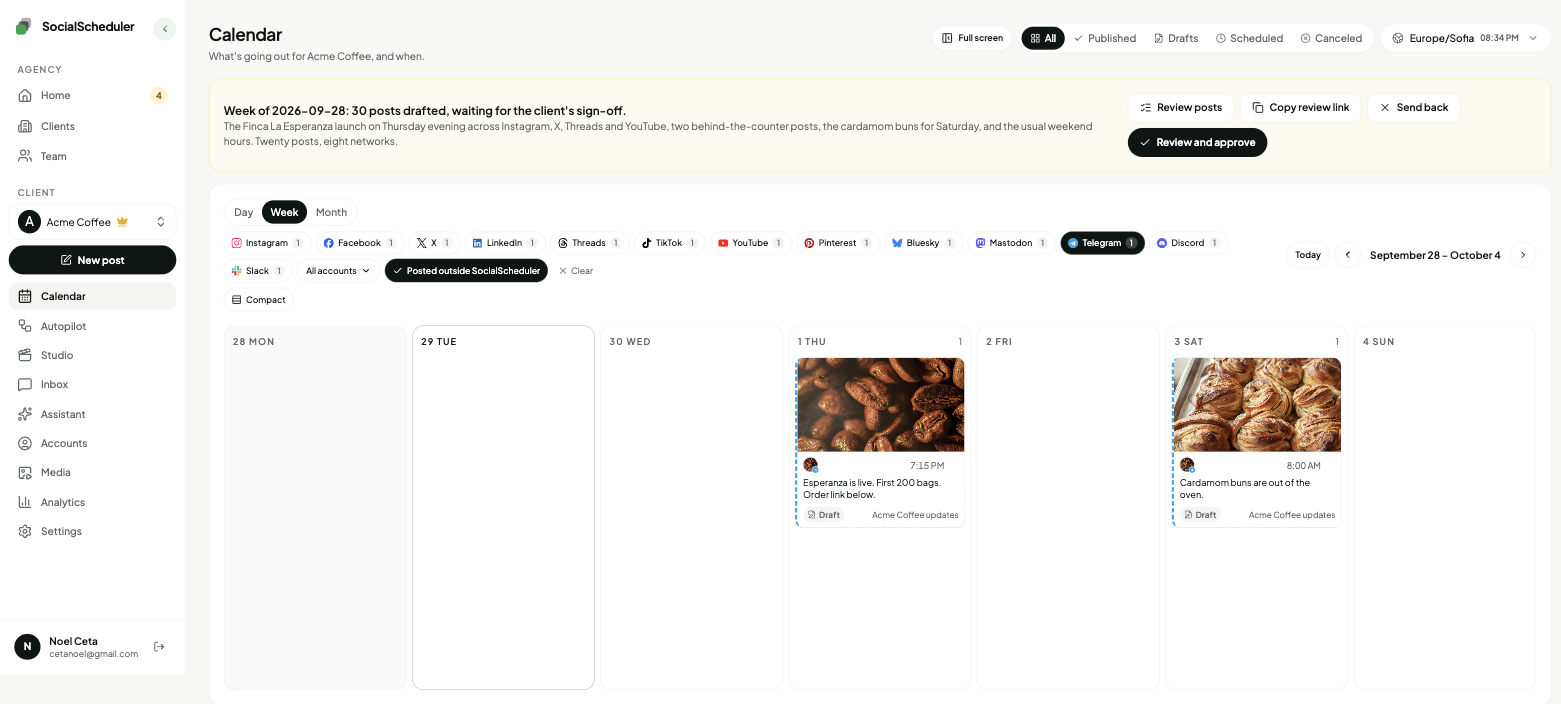
Planned Sunday. Waiting for approval.
- Mon08:30TextThis week at Acme: autumn roast on Thursday, a new cardamom bun, longer Saturday hours.
- Wed12:00ImageFirst look at the autumn roast bag. Chocolate, plum, a long finish.
- Fri17:00TextWeekend brew guide: three recipes for the new roast, from easy to fussy.
You choose who says yes.
Per client. Change it any time. Your team can pull any Telegram post until it goes out.
Agency reviews
DefaultYour team approves the week in the app. Nothing goes out before.
Client signs off
Most usedThe client gets an email link. They approve or comment. No login.
Review link · no login needed
Dana (Acme) · approved Mon 10:12
Full autopilot
For trusted clientsNo approval step. It plans and posts. Everyone gets a Monday report.
Client report every Monday, 9:00
Pause any time, pull any post
Why brands and agencies use Telegram channels
A Telegram channel is a one-way broadcast. Only admins post, the posts show the channel's name and photo, and a channel can have any number of subscribers. There is no ranking algorithm: every post lands in each subscriber's chat list in time order and, unless they muted the channel, sends a notification.
That makes a channel closer to an email list than a social feed. Telegram reports over 1 billion monthly active users, and each channel post carries a public view counter, so reach is easy to see. For a cafe, a shop or a local service, a channel is a direct line to the people who asked for updates.
- Channel: broadcast, admins post, unlimited subscribers
- Group (a supergroup once it grows): everyone chats, up to 200,000 members
- Private chat: one to one, not for publishing
Set up the bot as a channel admin in two minutes
Telegram has no login for outside apps, so posting runs through a bot the client owns. Nobody shares a phone number or a password, and the bot token is the only credential.
If the bot is removed, loses "Post messages" or has its token revoked, publishing stops and SocialScheduler asks you to reconnect. Anyone with the token can post as the bot, so keep it private.
- In Telegram, open @BotFather, send /newbot and copy the token
- Open the channel, go to Administrators, add the bot and keep "Post messages" on
- In SocialScheduler, choose Telegram and paste the token and the channel's @username (or its -100 id for a private channel)
Formatting, captions and media
The Bot API allows 4,096 characters in a text message and 1,024 in a media caption. SocialScheduler checks both before a post is scheduled. When a post with a photo or video has more than 1,024 characters, the media goes out first and the full text follows as its own message, so nothing is cut.
Posts go out as plain text with link previews on. Line breaks, lists and emoji work; bold, italics and other Markdown or HTML formatting, silent posts, polls and pinning are not used. Photos can be JPEG, PNG or WebP up to 10 MB, up to 10 in one album. Video is one file up to 50 MB, which is the Bot API upload limit.
How the agency workflow runs
Each client has a brief: voice, offers, links, topics to avoid. On Sunday the AI plans the client's week across every network they use and writes the Telegram posts as longer plain-text updates with links, plus the images they need.
Then someone says yes. Your team approves in the app, or the client opens an email link to the week and approves, comments or asks for a change without a login. Clients you trust can run on autopilot. On Monday each client gets a report under your agency's name. For Telegram it shows the subscriber count, because the Bot API does not give per-post views to outside apps.
- Sunday: the week is planned and drafted
- Review: your team or the client approves from a link
- During the week: posts go out at the client's best hours
- Monday: a report under your agency's name
The best time to post on Telegram
No large public study covers Telegram the way Sprout Social and Buffer cover Instagram or Facebook. Channel guides mostly point to weekday mornings (about 7 to 9 a.m.) and early afternoon in the audience's time zone, with Tuesday to Thursday strongest. Because the feed is chronological, a post sent at 3 a.m. sits under everything else by morning.
The real answer is in the channel's own numbers. Telegram shows channel statistics to admins once a channel reaches 50 subscribers, including when subscribers view posts. SocialScheduler schedules each client's posts for the hours their audience is online, and you can move any post.
Is there a free Telegram scheduler?
Yes. The Telegram app schedules messages in any chat, channels included: hold Send, choose Schedule Message, and pick a time up to 365 days ahead, with up to 100 scheduled messages per chat. It is manual, one channel at a time, with no approval step.
SocialScheduler's free plan covers one client with up to 3 connected accounts and 20 AI credits a month. Publishing never costs credits, and a planned week costs 10. For more clients, Business is $49 a month for 5 clients and Agency is $149 a month for 15, with 20% off yearly.
One plan, every network.
Each client's week is written once, then sized for every network they are on.
- Telegram schedulerThis page
- Discord scheduler
- Slack scheduler
- Mastodon scheduler
- Instagram scheduler
- TikTok scheduler
- X scheduler
- Threads scheduler
- Facebook scheduler
- LinkedIn scheduler
- YouTube scheduler
- Pinterest scheduler
- Bluesky scheduler
Also publishes to Reddit, Google Business Profile, Dev.to, Hashnode, WordPress, ListMonk and Lemmy.
Telegram questions, answered.
Yes. In the Telegram app, hold the Send button and choose Schedule Message, up to 365 days ahead. Tools like SocialScheduler schedule channel posts through the Bot API instead.
As an admin, write the post, hold Send, choose Schedule Message and pick the date and time. With SocialScheduler, the client's bot posts it at the planned hour after approval.
Yes. Only admins can post in a channel, so the bot must be added as an administrator with the "Post messages" right. It needs no other rights.
No. SocialScheduler posts to Telegram channels only, public or private, and refuses a group when you connect it. Groups are for conversation, channels for broadcast.
4,096 characters for a text message and 1,024 for a caption on a photo or video. When a media post runs longer, SocialScheduler sends the full text as a second message right after the media.
Yes. One photo, an album of 2 to 10 photos, or one video up to 50 MB. Photos and video cannot be mixed in one post.
No. Posts go out as plain text with line breaks, emoji and link previews. Markdown and HTML formatting are not used.
Up to 365 days in the Telegram app, with a cap of 100 scheduled messages per chat. SocialScheduler holds the post itself, plans one week at a time and publishes at the planned hour.
There is no large published study. Guides suggest weekday mornings and early afternoon in the audience's time zone. A channel's own statistics, available from 50 subscribers, show when its readers are online, and SocialScheduler posts at those hours.
It tracks the channel's subscriber count. The Bot API does not share per-post views or reactions with outside apps, and there is no Telegram inbox, so views stay in Telegram's own statistics.
Yes. The client gets an email link with the week and can approve, comment or ask for a change. No login. Or your team approves, or you turn on autopilot for clients you trust.
Yes. SocialScheduler only uses official APIs. No browser automation, no shared passwords.
Facts on this page reviewed
Start with one client.
Ten minutes to set up. The first week is planned right away.