The Slack scheduler for team announcements, community Slacks and client channels.
SocialScheduler plans each client's Slack updates with the rest of their week and posts them through a bot to the channel you choose. Text, images and files go out on time, after you or the client approve.
You can schedule a single Slack message natively: type it, click the arrow next to the send button and choose Schedule for later, up to 120 days ahead. A Slack scheduler like SocialScheduler is for regular channel updates: its AI writes each client's announcements in Slack formatting, someone approves them, and a bot the workspace installs posts them to the chosen channel. It is built for internal announcements, community Slacks and client update channels, not for audience growth.
Free for one client. No credit card.
Slack scheduling at a glance
- Native scheduling
- Schedule for later, up to 120 days ahead (Slack developer docs, September 2026)
- Message length
- Slack truncates text over 40,000 characters and recommends 4,000; SocialScheduler caps posts at 4,000
- Files per post
- Up to 10 images (JPEG, PNG, GIF, WebP) or one MP4 or MOV video, 50 MB each
- Connection
- A bot installed with Slack OAuth; scopes chat:write, chat:write.public, files:write, channels:read, groups:read
- Channels
- Any public channel without an invite; private channels after /invite @SocialScheduler
- Free Slack workspaces
- Up to 10 third-party apps and 90 days of visible history (Slack Help Center, 2026)
- Best times
- Weekday mornings; Tuesday around 10 a.m. for North American teams (ContactMonkey internal comms benchmark, June 2026)
- Free plan
- 1 client, 3 accounts, 20 AI credits a month; publishing never costs credits
Every Slack format your clients use.
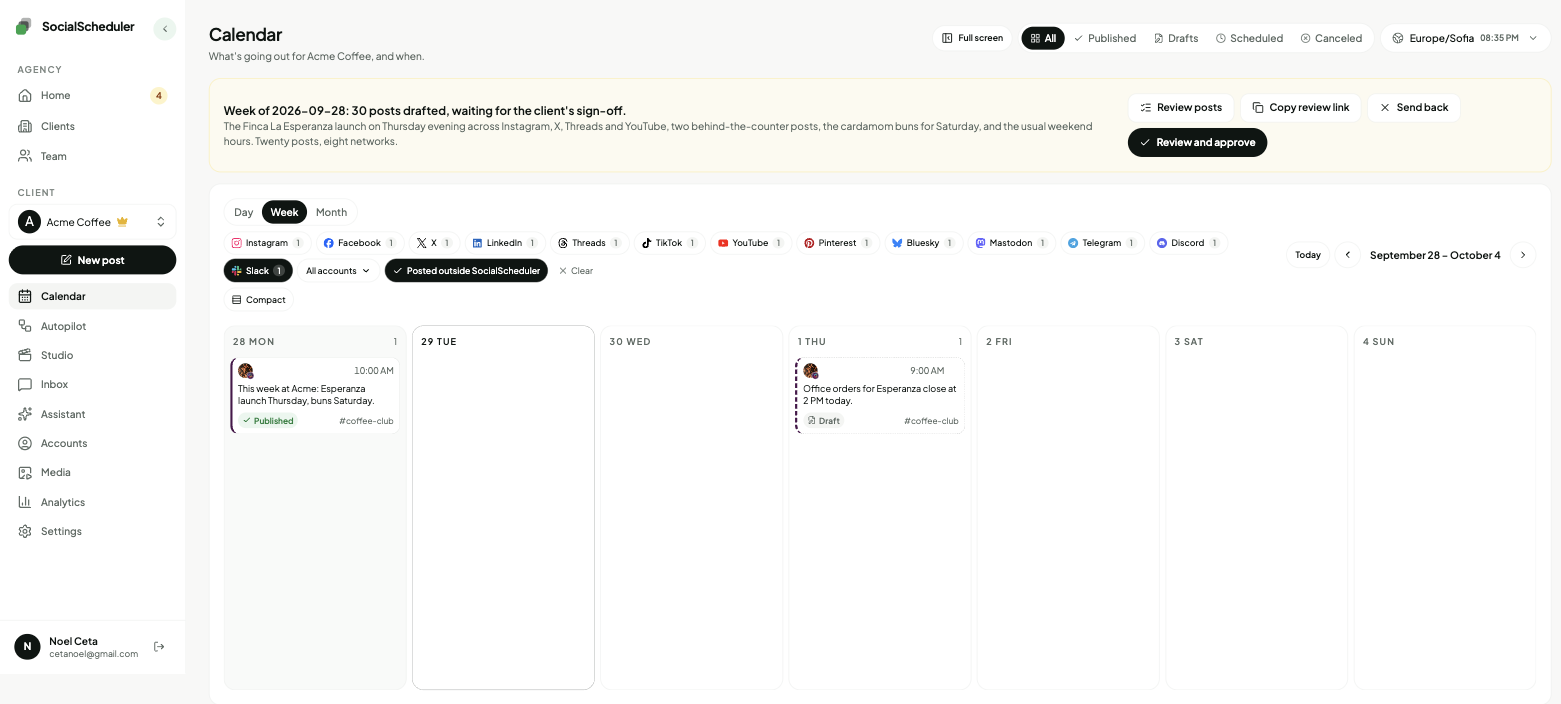
Planned on Sunday with the rest of the week, written as a channel update in the client's voice, posted by a bot to the channel you choose.
Text updates
Slack formatting: *bold*, _italic_, lists and named links. Up to 4,000 characters, link previews on.
Images
Up to 10 images shared as files with the text as the message. A photo from the library or one the AI designs.
Video
One MP4 or MOV up to 50 MB, added in the composer. The weekly planner sticks to text and images.
Channel choice
Each workspace has a default channel. In the composer you can pick another channel for one post.
How the AI writes for Slack.
The limits and habits of the network are built in. Every post is checked against them before it is scheduled.
- Written as a channel update, not a social post
- No hashtags
- Key point in the first line, details below
- Slack formatting, under 4,000 characters
- Posted by the SocialScheduler bot to the chosen channel
- No engagement bait
- Posted at the planned time, which you can move
Planned Sunday. Waiting for approval.
- Mon09:30Text*This week at Acme:* three things worth knowing.
- Wed10:00ImageThe autumn roast label is final. Here it is before it ships.
- Fri11:00Text*Weekly recap:* what shipped, what moved and one question for you.
You choose who says yes.
Per client. Change it any time. Your team can pull any Slack post until it goes out.
Agency reviews
DefaultYour team approves the week in the app. Nothing goes out before.
Client signs off
Most usedThe client gets an email link. They approve or comment. No login.
Review link · no login needed
Dana (Acme) · approved Mon 10:12
Full autopilot
For trusted clientsNo approval step. It plans and posts. Everyone gets a Monday report.
Client report every Monday, 9:00
Pause any time, pull any post
What a Slack scheduler is for, and what it is not
Slack is a workplace chat app, not a social network. Nobody discovers a brand by scrolling Slack, and no feed algorithm will push a post to strangers. So a Slack scheduler does not grow an audience. It keeps a group of people who already joined a channel informed, on a steady rhythm.
That makes it useful in three places. Inside a company, for team announcements and weekly updates. In a community Slack, where members expect news, events and a prompt to talk. And in a client update channel, where an agency reports progress to the client in the tool the client already reads all day.
- Team announcements: launches, policy changes, the week ahead
- Community Slacks: events, releases, a weekly discussion prompt
- Client update channels: progress, approvals needed, results
Slack's free Schedule for later versus a scheduler
Slack has had free native scheduling on every plan since 2021. Type the message, click the arrow next to the paper plane and choose Schedule for later; on mobile, tap and hold the send icon. Messages wait under Drafts and sent, up to 120 days ahead. For one message from one person, that is enough.
It falls short when updates are part of a plan: no approval step, no writer, no view of other networks, no report, and repeats need Workflow Builder. SocialScheduler's free plan covers one client with 3 connected accounts, a Slack workspace included, and 20 AI credits a month. A planned week costs 10 credits; publishing costs none. Business is $49 a month for 5 clients and Agency $149 for 15, with 20% off yearly.
How the Slack bot connects and picks a channel
A workspace admin, or anyone allowed to add apps, clicks Connect Slack and approves the SocialScheduler app on Slack's own screen. That installs a bot with five scopes: chat:write and chat:write.public to post, files:write to share images, channels:read and groups:read to list channels. It cannot read message history or direct messages. Free Slack workspaces allow up to 10 apps, and the bot counts as one.
Then you set the workspace's default channel on its row in Accounts. Public channels work without an invite. For a private channel, type /invite @SocialScheduler in it first. In the composer you can send one post to a different channel. Posts appear from the SocialScheduler bot, not from a person's account.
Slack formatting, files and message length
Slack uses its own markup, called mrkdwn: *asterisks* for bold, _underscores_ for italic, and links written as <https://example.com|a label>. The AI writes in that format, keeps the key point in the first line and adds no hashtags, which mean nothing in Slack. Link previews unfurl as they would for a person.
Slack truncates messages over 40,000 characters and recommends 4,000, so SocialScheduler caps each post at 4,000. Images go up as files, up to 10 per post in JPEG, PNG, GIF or WebP, with the text as the message; a post can instead carry one MP4 or MOV video. Our limit is 50 MB per file, well under Slack's 1 GB. Threads, polls and Block Kit layouts are not supported.
A client update channel with Slack Connect
Slack Connect lets two organizations share one channel, with up to 250 organizations in a channel. Many agencies already talk to clients this way. Slack says each organization needs a paid plan to work in a Slack Connect channel, though Enterprise owners can let free teams join.
Install the bot in your agency's workspace, choose the shared channel, and the client gets a regular update where they already work. The brief sets the voice and topics. On Sunday the AI plans the week and drafts the posts: Monday, the plan and anything that needs a decision; midweek, a finished image or result; Friday, a short recap. The client approves from an email link without a login, and the Monday report goes out under your agency's name. If the other organization restricts apps in shared channels, Slack refuses the post and SocialScheduler says why.
The best time to post in Slack
There is no large public study of Slack channel timing, so internal communications data is the best guide. ContactMonkey's June 2026 benchmark of more than 255,000 internal emails found North American teams most responsive on Tuesday around 10 a.m., and most industries peaking on weekday mornings.
For Slack that suggests weekday mornings in the channel's time zone, early afternoon as a second choice, and little after 5 p.m. or on weekends, unless it is a community that is active then. Pick the hour that suits each channel's readers when you plan, and move any post from the calendar.
One plan, every network.
Each client's week is written once, then sized for every network they are on.
- Slack schedulerThis page
- Discord scheduler
- Telegram scheduler
- LinkedIn scheduler
- Instagram scheduler
- TikTok scheduler
- X scheduler
- Threads scheduler
- Facebook scheduler
- YouTube scheduler
- Pinterest scheduler
- Bluesky scheduler
- Mastodon scheduler
Also publishes to Reddit, Google Business Profile, Dev.to, Hashnode, WordPress, ListMonk and Lemmy.
Slack questions, answered.
Yes. Type the message, click the arrow next to the send button and choose Schedule for later. On mobile, tap and hold the send icon. Slack allows scheduling up to 120 days ahead.
Click Drafts and sent at the top of the sidebar, then open Scheduled. On mobile, go to the Home tab and tap Drafts and sent. From there you can edit, reschedule or delete them.
No. A scheduled message arrives as a normal message at the time you set, with no scheduled label. Posts from SocialScheduler come from its bot, so readers see they were sent by an app.
Slack's native Schedule for later sends one message. For repeats, Slack points to Workflow Builder, or you use an app. SocialScheduler writes a fresh update each week instead of repeating the same text.
Through Slack's official app install. Someone allowed to add apps approves the SocialScheduler bot, then you choose a default channel. The bot can post and share files but cannot read messages.
Yes, once invited. Type /invite @SocialScheduler in the private channel and it appears in the channel list. Public channels work without an invite.
Each workspace posts to its default channel, and in the composer you can send a single post to any other channel the bot can reach. Planned weekly posts use the default channel.
Slack truncates text over 40,000 characters and recommends staying under 4,000. SocialScheduler keeps every post within 4,000 characters.
Yes, when the shared channel is in the workspace where the bot is installed and neither organization blocks apps there. Slack requires a paid plan on each side for most Slack Connect channels.
No. There is no Slack inbox. The bot has no permission to read history, so replies stay in Slack. Metrics show the channel's member count, not reactions.
Yes. SocialScheduler only uses official APIs. No browser automation, no shared passwords.
Yes. The client gets an email link with the week and can approve, comment or ask for a change. No login. Or your team approves, or you turn on autopilot for clients you trust.
Facts on this page reviewed
Start with one client.
Ten minutes to set up. The first week is planned right away.